Write in sixteen languages. Even all of them at once.
TheOneC reads the common core of Python, JavaScript, Java, C, C++, C#, Go, Rust, Kotlin, Swift, Ruby, Lua, PHP, TypeScript and Visual Basic. It reads them mixed in one file, even in one function. It works out the language of every line, keeps each language's own rules, and compiles the whole program to native code, WebAssembly, Python, or C# for Unity.
A tool I built for my own work and found useful, offered as it is. It runs on your computer, and your code never leaves it.
average.mix
PYdef average(xs):
total = 0
JS for (let i = 0; i < xs.length; i++) {
total += xs[i]
}
PY return total / len(xs)
JAVApublic static int square(int x) {
return x * x;
}
RSfn cube(x: i64) -> i64 {
x * x * x
}
PYnums = [3, 1, 4, 1, 5]
print("average:", average(nums))
print("square:", square(7), " cube:", cube(3))
JAVASystem.out.println("7 / 2 in Java is " + 7 / 2);
JSconsole.log("7 / 2 in JavaScript is", 7 / 2)
▶ output
average: 2.8
square: 49 cube: 27
7 / 2 in Java is 3
7 / 2 in JavaScript is 3.5
This sample was analyzed and run by TheOneC itself when this page was built. Each bar shows a line's language.
How it works
1
It reads every line
Each line is matched against clues for each language: console.log means JavaScript, fn … -> i64 means Rust, def …: means Python. The code around a line helps decide close calls. Hover over a line to see why it was labeled the way it was, and pin the language with a lang: comment when it's genuinely ambiguous.
2
It keeps each language's meaning
7 / 2 is 3 on a Java line and 3.5 on a JavaScript line, in the same program. Division, remainders, rounding and printing follow the rules of the language each line is written in.
3
It compiles it all, fast
One optimizer handles the whole program: type inference, inlining, constant folding and bounds-check removal. Then it produces native code, WebAssembly, Python or C#. On one n-body physics benchmark, native code ran 78× faster than CPython and WebAssembly 24× faster (measured on the developer's PC; other programs and computers will differ).
FOR DEVELOPERS
TheOneC for VS Code
A paid add-on for Visual Studio Code. It adds TheOneC to the editor you already use.
The language of every line, as a colored bar in the gutter, with the evidence on hover
Run any mixed file on the fastest engine available, with output in the TheOneC panel
Show the generated code (C, Python, WebAssembly text or IR) beside your file
Explain the optimizer: see what every pass changed
Problems and Outline, with the languages used in each function
Pin Language for Selection, for genuinely ambiguous lines
Handy for trying a port one line at a time, seeing where /, % and rounding behave differently between languages, and working out which language an unlabeled snippet is.
3.8 or newer on the computer where you edit (it runs the bundled compiler). Games you build don't need it.
Install
Download the .tgz from your license page, then Package Manager › + › Add package from tarball…
Tested on
Unity 6 (6000.0) on Windows 10 with Python 3.10: installed from the tarball, files compiled in the editor and called from C#, and Windows builds run with both Mono and IL2CPP. Older Unity versions, mobile, WebGL, macOS and Linux haven't been tested yet.
FOR EDUCATORS
TheOneC Education
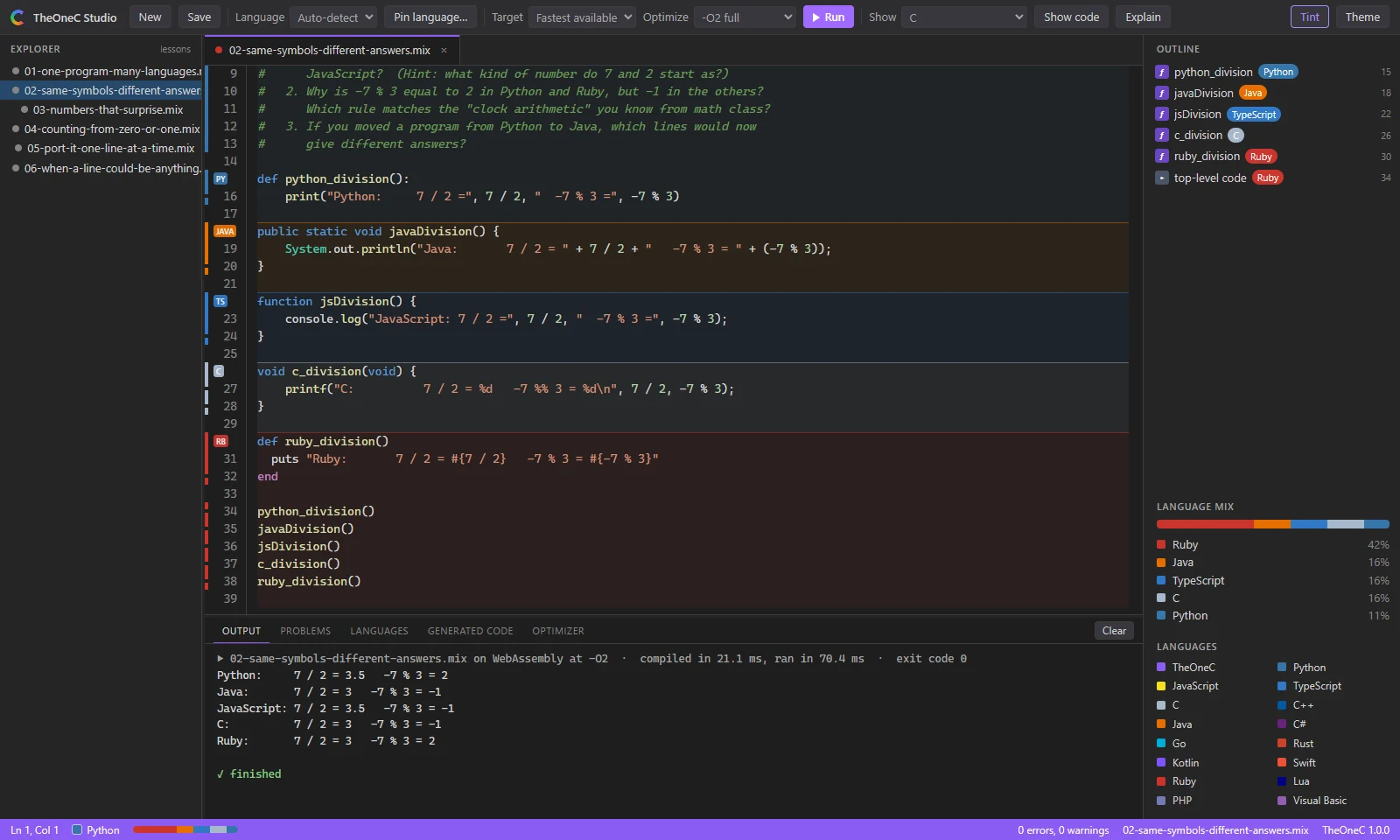
TheOneC Studio is a friendly editor that opens in the browser. It comes with six ready-to-use lessons in which students see that languages really differ, and why.
One program, many languages
Same symbols, different answers (7 / 2, -7 % 3)
Numbers that surprise (0.1 + 0.2, banker's rounding)
Counting from zero, or one (off-by-one bugs)
Port it, one line at a time
When a line could be anything
No student accounts. No names or emails are collected.
Launchers for Windows, macOS and Linux (tested on Windows so far). Needs Python 3.8 or newer.
Includes a teacher guide, launchers and discussion questions.
Lesson 2 in TheOneC Studio: the same arithmetic in five languages gives each language's own answer.
Pricing
Prices are in US dollars. Payments are processed securely by Stripe.
Developer
$10 per user per month
TheOneC for VS Code. Billed monthly; cancel anytime. Each seat covers two devices.
Unity
$10 one time
TheOneC for Unity, for one person on up to two computers. Pay once: no subscription and no end date.
Classroom
$10 per student per year
TheOneC Education for one class or department, with 10 seats minimum. Paid once for 12 months, with no automatic renewal.
School site
$1,500 per school per year
TheOneC Education for unlimited students and staff at one campus, for 12 months.
All sales are final. You can cancel a Developer subscription online at any time. Need a purchase order or a quote? Email nyctitropist@gmail.com.
What TheOneC is, and isn't
TheOneC is a tool I built for my own work and found useful. It's offered as it is, not as a solution designed for your needs. Read what it does and doesn't do here before buying. All sales are final.
It compiles
The common core of each language: functions, classes and methods, lists and arrays, strings, loops, switch/match/when, simple lambdas passed to list methods, and formatted printing. Its results are checked against the languages' own tools where they're installed (CPython, Node.js, the JDK, .NET and Visual C++); expected results for Go, Rust, Kotlin, Swift, Ruby, Lua and PHP were checked by hand.
Not yet
Dictionaries and maps, exceptions, inheritance, and each language's packages and standard library. TheOneC is for exploring, teaching, comparing and porting code. It doesn't replace your production compiler.
Questions
Does my code get uploaded?
No. TheOneC compiles on your own computer. Activating a license sends only the license key, an anonymous device ID (a hash) and a short device label such as "VS Code on Windows_NT".
Does it work offline?
Yes, once it's activated. Each device renews its license about once a month when it's online, and keeps working offline until then.
How many computers can I use?
Two devices per seat for Developer and Classroom licenses, and two for a Unity license. To move a seat, deactivate the old device, or reset all devices from your license page once a day.
Can I cancel?
Yes. Open your license page and choose Manage or cancel subscription. A cancelled Developer subscription keeps working until the end of the month you've paid for. Education licenses last 12 months and don't renew automatically. A Unity license is a single payment, so there's nothing to cancel. All sales are final.
Which languages, exactly?
Python, JavaScript, TypeScript, C, C++, Java, C#, Go, Rust, Kotlin, Swift, Ruby, Lua, PHP, Visual Basic, and TheOneC's own small language.
What has it been tested on?
TheOneC and Studio are tested on Windows 10 with Python 3.10, against the real tools listed above. The VS Code add-on is checked by automated tests that simulate VS Code. The Unity add-on was tested in Unity 6 on Windows 10, including Windows builds with Mono and IL2CPP. macOS and Linux haven't been tested yet. Check the system requirements before buying. All sales are final.
What about taxes and invoices?
Stripe emails a receipt for every payment. If your school needs an invoice or a purchase order, email support before buying.